Newer work · Cre8tive Sales
LinkedIn keeps two sales seats apart. I built the place where the whole team sees everything.
I built Cre8tive AI's sales workspace in a day. It researches every prospect, writes each approach and gives the whole team one view of the outreach, and when LinkedIn's limits nearly ended the programme, I had the fix live the same evening.
- Result
- A 300-person outreach programme that runs every weekday, each approach researched, written and waiting on the sender's phone. It kept the programme's second Sales Navigator seat. In its first three days of sending it reached 21 decision-makers, every one researched first.
- My part
- All of it. The recommendation that started it, the design of the system and of the workspace, and the build.
- When
- Built on 19 October 2026. The shared dashboard went live on 20 October. In daily use since.
The dashboard
The dashboard: both seats in one view, with every company and person we're going after, who's contacting them, how far they've got, why now and what's next. Every company and person on these screens is invented, the directors' names included, because the real outreach is Cre8tive AI's own.
Full size ↗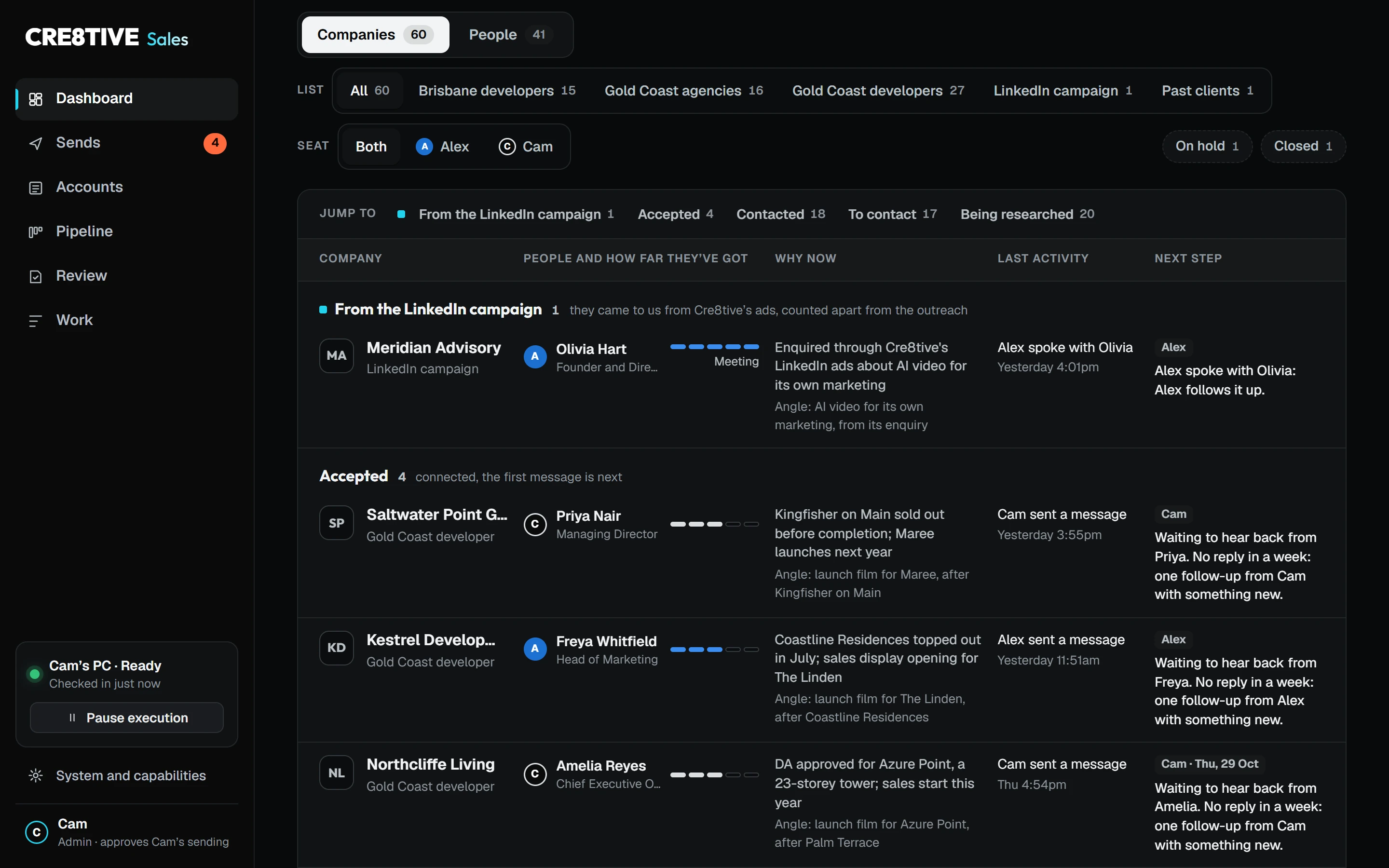
Where it came from
It started with the daily report I built on Cre8tive AI's LinkedIn ads. Going through the campaigns, I found that LinkedIn will tell you which companies are seeing your ads, but generally not who. So I recommended going to those people directly through Sales Navigator, and reaching the Gold Coast agencies the directors were interested in the same way.
On 19 October Cre8tive AI bought two Sales Navigator seats, one for me and one for one of the directors, for an outreach programme I was asked to run: 300 decision-makers in 30 days. It goes after Gold Coast developers with apartment towers approved but not yet built, and the project marketing agencies that sell those apartments off the plan. Cre8tive's offer to them is a launch film of the finished building, made from the plans before there's anything to film.
The directors wanted approaches going out that afternoon. My whole thing is methodical: I understand something first, then take action, and there was a lot more to Sales Navigator than either of us had thought. Every approach needed a protocol. So before anything went out, I built the way all of us would see everything and stay updated, and the research and personalisation behind every prospect. The first approaches went out the next morning.
What I built
- Sales Navigator
- Gemini 4 Argon
- Claude Opus 5.5
- Sends
I built it first as tooling for my AI agents: a full automation suite for LinkedIn that any of them can use, Claude, Codex and Gemini alike, so the repeatable work there runs through proper tools instead of an agent clicking its way around a browser. Sales Navigator came first. On top of those tools sits Cre8tive Sales, one workspace for the three of us, running on Google Cloud. Before the team used it, I had a second model audit the whole design and tell me how it would have built it from scratch, and I took its strongest calls, including Face ID approval for anything that goes out in my name.
Every weekday at 7:30 an agent reads what came back overnight, picks the day's people from Sales Navigator and researches each company before a word gets written: their projects, their launches, the person's role. Then it writes the approach, up to ten new people a day, each one in the voice of whichever of us is better suited to that person, with its research beside it.
Two models split the work. Gemini 4 Argon does the first research pass on new companies, and Claude Opus 5.5 checks every fact it brings at its source before a word of it is used. Argon also keeps our shared lists inside Sales Navigator in step with the workspace, so the directors see the same picture in LinkedIn itself.
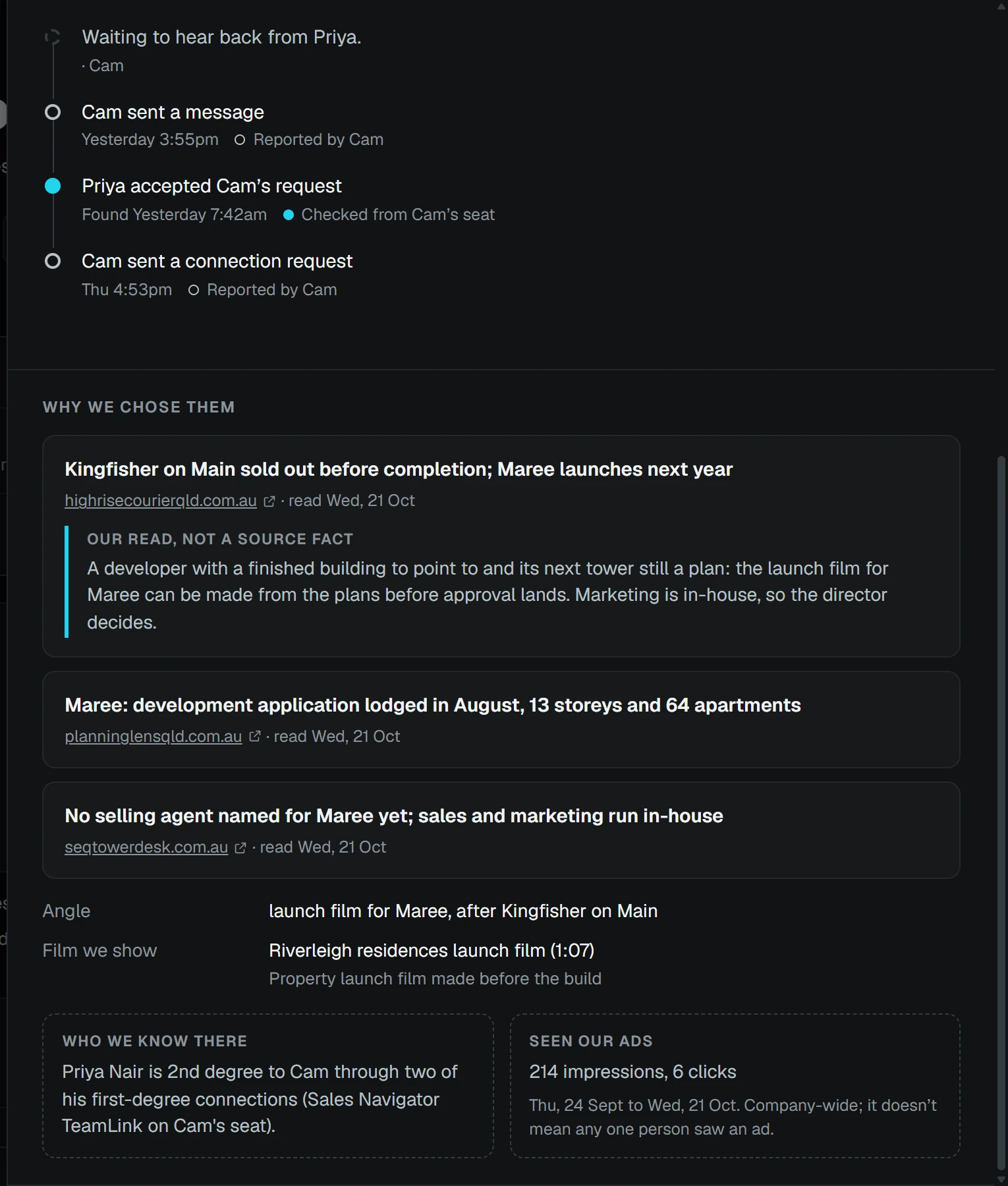
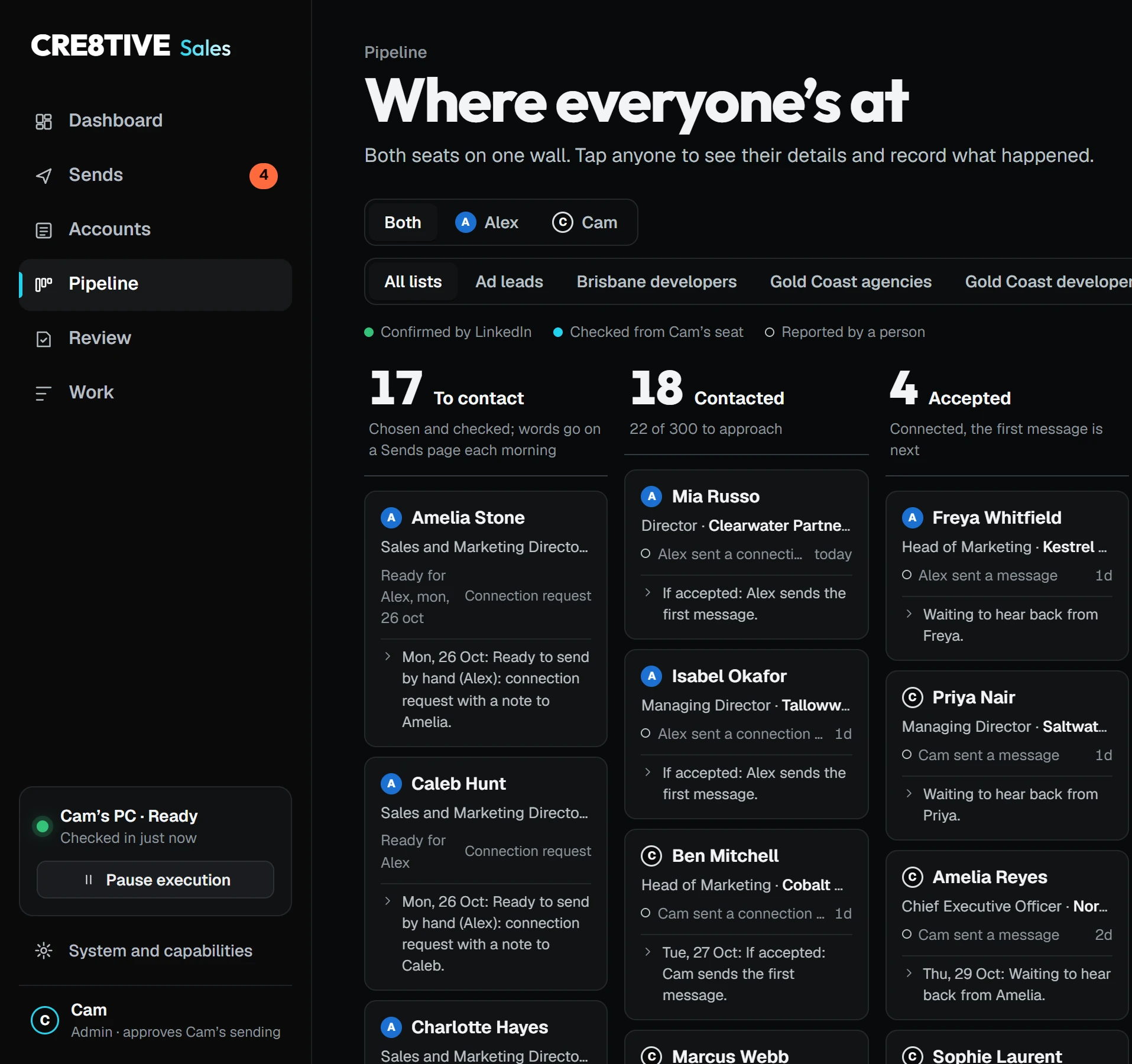
The workspace is what the team works from. The dashboard puts both seats in one view: every company and person we're going after, who's contacting them, where they're at and what's next. Open a company and you get why we chose them, every fact with its source. Sends has each person's approaches for the day, ready to copy, with one tap to record that it went. Pipeline is the stage wall, so anyone can see where the programme is at. Signing in is a Face ID tap on your phone.
The screens
What stays by hand
I built it so it could send from my seat once I'd approved the exact words with Face ID, and I tested that live. Then I decided the send stays by hand. LinkedIn restricts accounts that automate messages, and the accounts doing the sending are ours, so that's the boundary we keep. Everything else runs by itself: the reading, the research, the writing, the tracking and the list upkeep.
Knowing what not to automate is part of the job as much as what to automate.
The night it nearly ended
On the programme's second day, one of the directors found that LinkedIn doesn't let two Sales Navigator seats see each other's work. He had been building lists by hand, because he couldn't see what had already been done on my seat, and he was ready to cancel the second seat. But that seat is where the research runs.
I walked him through what the system does with it, and he kept it. Then I fixed the problem he'd actually hit: if LinkedIn won't show one seat the other's work, the workspace will. It had to match or do better than what LinkedIn does, so that keeping the seat was a no-brainer. That same evening I built one shared dashboard for both seats and both directors, live a little after eight, under three hours after he raised it, and the agent that keeps our shared Sales Navigator lists in step with it.
How it's used now
The director who nearly cancelled doesn't look anyone up any more. He opens Sends on his phone, copies the approach, sends it and taps that it went, about two minutes a person. The other director has no seat of his own and sees the whole programme in the same dashboard.
In its first three days of sending, the outreach reached 21 decision-makers, every one researched first, from 42 companies the system has researched. Both seats are still going.
It's also the other half of the morning report I built for the directors. Since 21 October that report has an outreach page, so every morning at 7 they see the ads and the outreach together.
On a phone
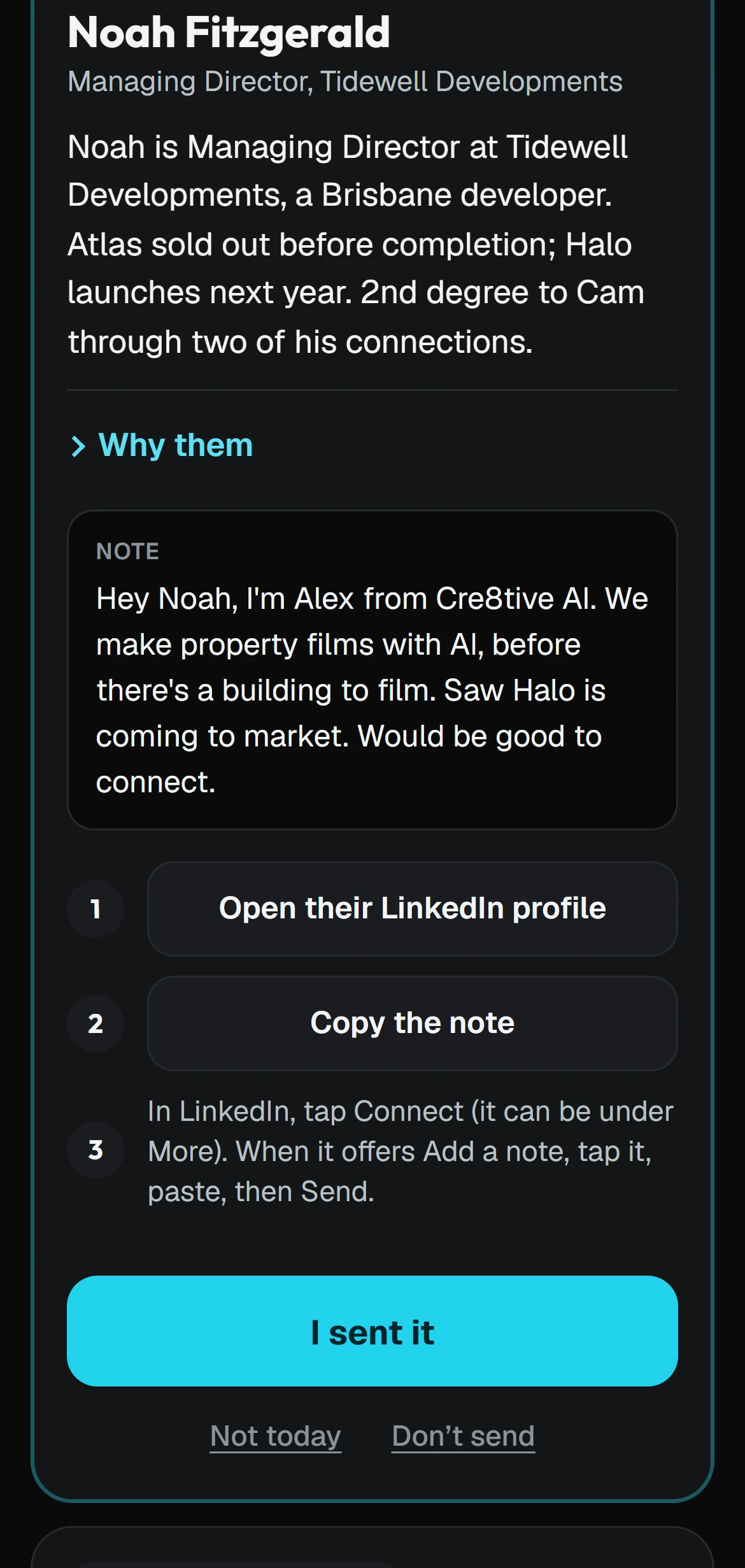
The people selling shouldn't have to research anyone or chase anyone for an update. The system does that part properly every day, and their time goes on the conversations.